
Permissions
Community Questions uses Confluence's space permissions to control access. You can configure who can view, add, and delete questions, votes, and tags for each space.
Configuring Permissions
To configure permissions:
- Go to Space Settings
- Navigate to Apps section
- Select Community Questions for Confluence from the dropdown
- Click Edit to modify permissions
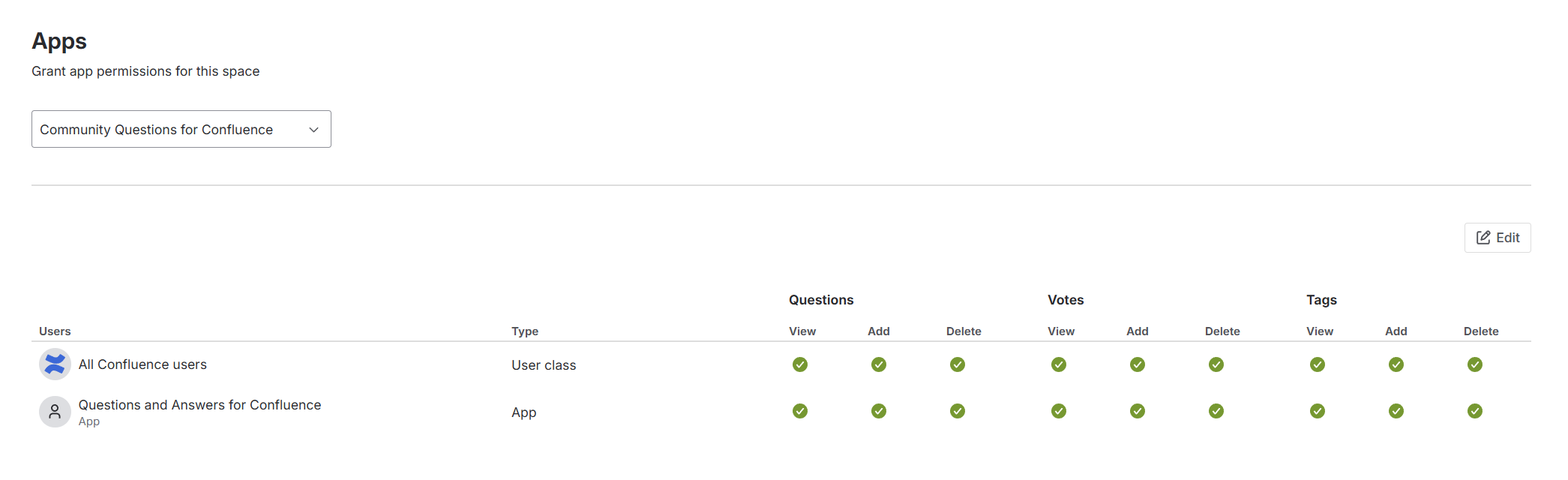
Permission Categories
| Category | View | Add | Delete |
|---|---|---|---|
| Questions | See questions | Ask questions | Remove questions |
| Votes | See vote counts | Upvote content | Unvote (remove your vote) |
| Tags | See tags | Create/add tags | Remove tags |
Note: For voting, users need both Add and Delete permissions enabled. Having only Add is not sufficient to upvote.
Supported User Types
You can grant permissions to:
- Individual users - Grant access to specific Confluence users
- Groups - Grant access to Confluence groups (e.g., confluence-users, developers)
- All Confluence users - Grant access to all licensed Confluence users in your organization
Limitation: The "All product admins" user class is not supported. If you need to grant permissions to administrators only, create a dedicated group and add your admins to it.
Troubleshooting
If you're experiencing permission issues, see the Permissions troubleshooting guide.